Compare · Paidtime vs Timing
Paidtime vs Timing
Both are automatic time trackers for the Mac. Pick Paidtime if you do creative project work and want the hours put on the right project as you work, with a question only when it needs one, for a one-time €24.99. Pick Timing if you want a detailed timeline of everything you did on your Mac, rules you set up yourself, a web app and integrations, and don't mind a subscription.
What Paidtime does differently
Sorted while you work, not afterwards
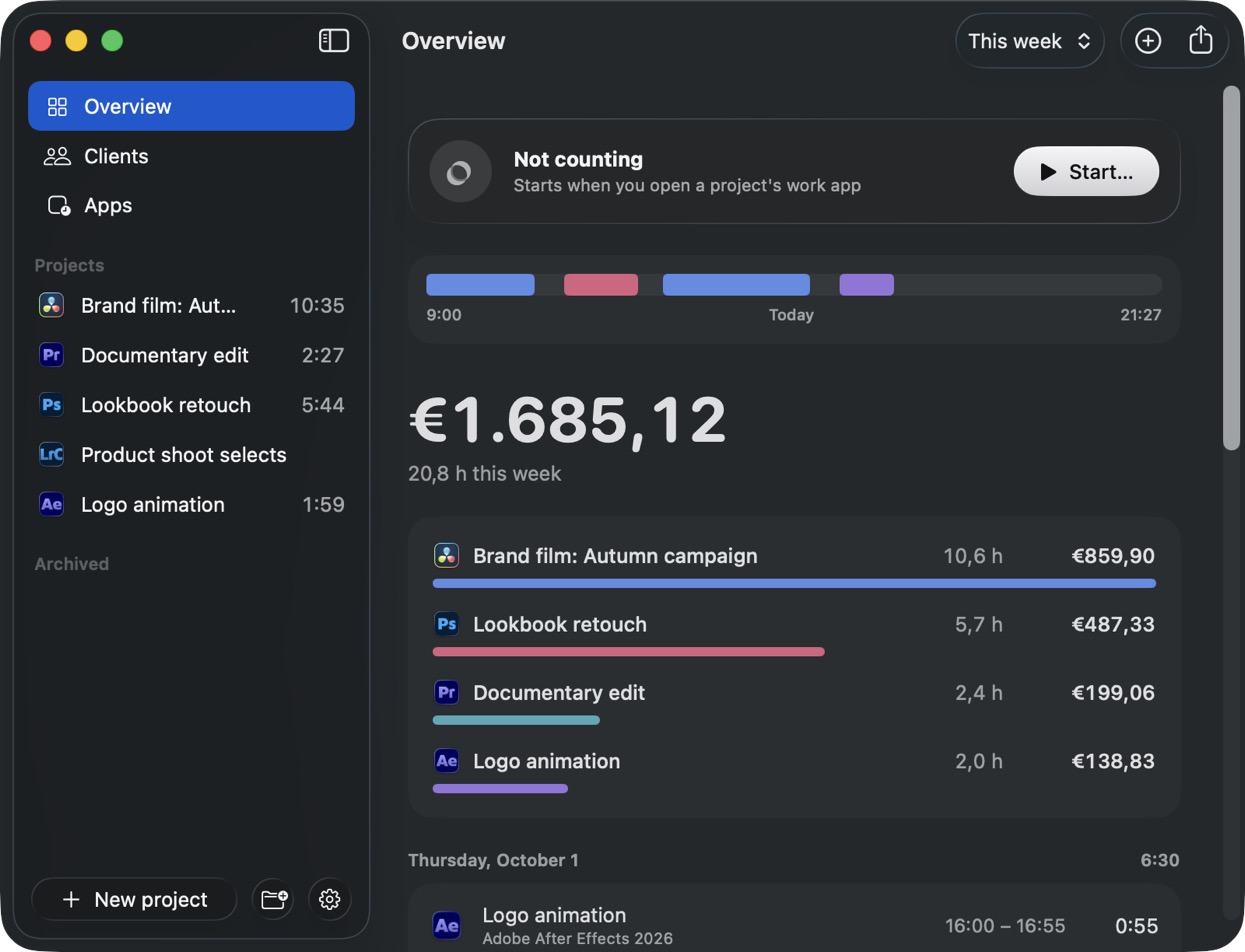
Timing records everything you do and you assign it to projects, by hand or with rules. Paidtime asks once which project a document is, then puts the time on that project by itself from then on.
Made for creative apps
It reads which project is open in Lightroom, Photoshop, Premiere Pro, DaVinci Resolve, After Effects, Figma and other creative apps, even with several open at once.
Quotes that hold
Day rates and fixed fees, a warning at 80% of the agreed days, and feedback rounds counted one by one.
Pay once
Timing is a subscription, with more features on higher plans. Paidtime is €24.99 once for one person, on two of your Macs.
When Timing is the better choice
- You want a full timeline of every app, document and website you used, to review later.
- You need integrations, a web app, an API or AppleScript, or invoicing through another tool.
- You want a longer trial: Timing gives 30 days, Paidtime 14.
- Your work is general knowledge work rather than projects in creative apps.
Side by side
Timing is a well-made app that many people like. This table is about fit, not about which one is better.
| Paidtime | Timing | |
|---|---|---|
| Price | €24.99 once (Team €49/year for 5 people) | Subscription, Professional from about $9 a month billed yearly |
| Free option | 14-day trial, no card | 30-day trial, no free plan |
| Platforms | Mac | Mac (with a web app) |
| Starting and stopping | Nothing to start: it follows the project you have open | Records automatically |
| Knows which project you're in | Yes, from the document or project open in your app | You assign the time, by hand or with rules |
| Time away from the desk | Pauses when you walk away or switch apps | Recorded; you decide what counts |
| Billing | Hourly, day rate or fixed fee | Hourly rates |
| Feedback rounds | Yes, each feedback round on its own | You can track rounds as separate tasks |
| Teams | Yes, up to 5 people for €49/year | Yes, on the Connect plan |
| Export | PDF summary, CSV, text | Reports, CSV and more, API on Connect |
Timing's prices and features checked on timingapp.com/pricing on 14 November 2026. Prices in their own currency, before tax.
Paidtime at a glance
- Platform
- Mac, macOS 15 Sequoia or later. A Windows version is built but not out yet.
- Price
- €24.99 once for one person, on two of your own Macs. Teams: €49 a year for up to 5 people.
- Free trial
- 14 days, no card. Full refund within 14 days of buying.
- How it counts
- Nothing to start or stop. It asks once which project a document is, then switches by itself.
- What it counts
- Only the time you're actually working. It pauses when you walk away, swipe to another desktop or click another app.
- Billing
- Hourly rate, day rate or fixed fee, per client or per project. Warns at 80% of the agreed days.
- Feedback rounds
- Counted one by one, so your next quote is based on what rounds really cost.
- Calls and meetings
- Asks which project a Zoom, Teams, Meet or FaceTime call was for, and whether a calendar meeting was work.
- Export
- Summary as PDF, spreadsheet (CSV) or text. Teams export a month of a project's hours as CSV.
- Your data
- Saved on your Mac, with backups in a folder you choose. Sync between your Macs through your account, stored in the EU (Ireland). No ads, never sold.
- Made by
- Sjoerd Wess, a filmmaker and YouTuber in Haarlem, the Netherlands. One person builds and supports it.
Full transparency
Paidtime is made by Sjoerd Wess, a filmmaker and YouTuber in Haarlem, the Netherlands. It started as his side project, because he never knew how long his own edits really took, and he still builds and supports it himself. It isn't free because there are no ads and no selling of data to pay for it: you pay once for yourself, or yearly for a team. Try everything for 14 days without a card, and if it isn't for you, you get a full refund within 14 days of buying.
Questions
Is Paidtime a good alternative to Timing?
Both are automatic time trackers for the Mac. Pick Paidtime if you do creative project work and want the hours put on the right project as you work, with a question only when it needs one, for a one-time €24.99. Pick Timing if you want a detailed timeline of everything you did on your Mac, rules you set up yourself, a web app and integrations, and don't mind a subscription.
How much does Paidtime cost?
€24.99 once for one person, on two of your own Macs, with 14 days free and no card. Teams are €49 a year for up to 5 people.
Does Paidtime run on Windows?
Not yet. Paidtime is a Mac app for macOS 15 Sequoia or later. A Windows version is built; vote for it on paidtime.app and it comes once enough people ask.
Where is my data kept?
On your Mac, with backups in a folder you choose. To keep your Macs the same, it syncs through your Paidtime account, stored in the EU (Ireland). You can turn sync off per Mac. No ads, and your data is never sold.
Try it on your next project
Install it, tick the apps you work in, and open a project. That's the setup.